
| 일 | 월 | 화 | 수 | 목 | 금 | 토 |
|---|---|---|---|---|---|---|
| 1 | 2 | 3 | 4 | 5 | 6 | 7 |
| 8 | 9 | 10 | 11 | 12 | 13 | 14 |
| 15 | 16 | 17 | 18 | 19 | 20 | 21 |
| 22 | 23 | 24 | 25 | 26 | 27 | 28 |
- GitOps
- 트랜잭션
- 동시성제어
- DevOps
- 성능 최적화
- helm
- kafka
- RDBMS
- webflux
- 백엔드
- 성능최적화
- spring boot
- SpringBoot
- 데이터베이스
- docker
- grafana
- NIO
- CloudNative
- prometheus
- 백엔드개발
- selector
- redis
- netty
- monitoring
- JPA
- mysql
- jvm
- Kubernetes
- Kotlin
- Java
- Today
- Total
유성
[클라우드 네이티브] 4편: Prometheus 메트릭 모니터링 아키텍처 구현(실전) 본문
[클라우드 네이티브] 3편: 고가용성 모니터링(메트릭) 아키텍처 설계 전략
지난 1, 2편에서는 로그 수집의 핵심인 ELK 스택을 고가용성 환경으로 구축하는 방법을 살펴보았다.로그가 서비스에서 발생하는 "기록"을 추적한다면, 이번에 다룰 메트릭(Metric)은 시스템의 "상태
youseong.tistory.com
이전 글에서는 모니터링 구조 설계에 대한 이론적 배경을 살펴보았다.
이번 실전 편에서는 ArgoCD와 Helm을 통해 실제 메트릭 모니터링 시스템을 구축하는 과정을 공유한다.
모든 인프라는 코드로 관리되며, 복잡한 설치 과정을 Helm 차트로 추상화하여 관리 효율을 높인다.
먼저, 실습에 사용할 인프라 구축 코드를 로컬 환경으로 가져오자.
# 실습 코드 클론 및 체크아웃
git clone https://github.com/youseonghyeon/k8s-argocd.git k8s-argocd
cd k8s-argocd
git reset --hard 3f96c03304a4592e236a81da7501da3a33ee6df5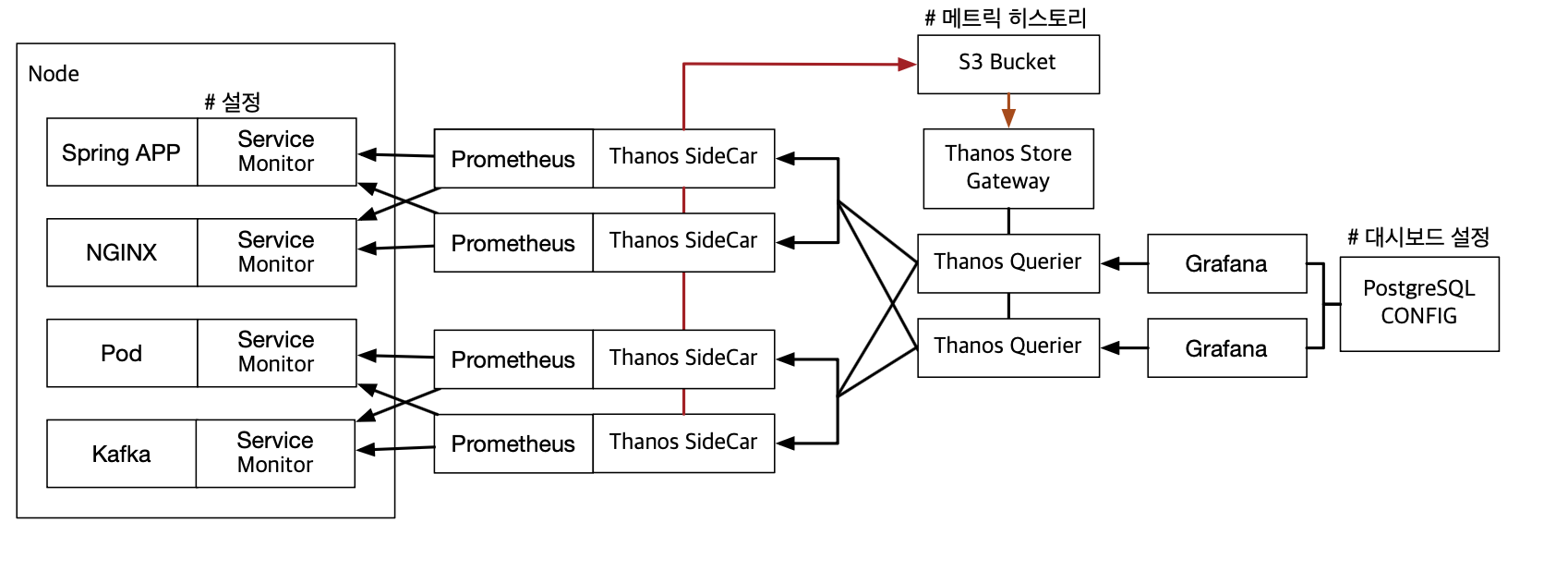
1. 메트릭 히스토리 저장소 설정
가장 먼저 메트릭 히스토리를 어디에 저장할지 지정해야 한다.
실제 운영 환경에서는 S3 Bucket과 같은 오브젝트 스토리지를 권장하지만, 이번 실습에서는 간편한 구동을 위해 로컬 파일 스토리지를 사용한다.
Thanos Sidecar가 Prometheus의 데이터를 이 경로로 업로드하게 된다.
메트릭 저장소 설정 (thanos/thanos-secret.yaml)
apiVersion: v1
kind: Secret
metadata:
  name: thanos-objstore-config
type: Opaque
stringData:
  objstore.yml: |
    type: FILESYSTEM
    config:
      directory: /prometheus/thanos-local-storage # 메트릭이 장기 보관될 경로
2. 메트릭 수집/조회 (Prometheus + Thanos Querier)
이제 kube-prometheus-stack과 thanos 차트의 의존성을 활용해 핵심 기능을 구동한다.
values.yaml 설정을 통해 프로메테우스에 타노스 사이드카를 심고, 쿼리어를 통해 통합 조회가 가능하도록 구성한다.
핵심 설정 (values.yaml)
kube-prometheus-stack:
  grafana:
    service:
      type: NodePort
    adminPassword: "admin"
    defaultDashboardsEnabled: true
  prometheus:
    retention: 1d                      # 로컬 디스크에는 1일치만 보관 (이후 삭제)
    prometheusSpec:
      serviceMonitorSelectorNilUsesHelmValues: false
      thanos:                          # Thanos Sidecar 활성화
        objectStorageConfig:
          key: objstore.yml            # 위에서 만든 Secret 참조
          name: thanos-objstore-config

thanos:
  additionalEndpoints:
    - dns+prometheus-operated.infra.svc.cluster.local:10901
  query:
    enabled: true                      # Thanos Querier 활성화
    readinessProbe:
      initialDelaySeconds: 10
      timeoutSeconds: 10
      periodSeconds: 10
      failureThreshold: 6
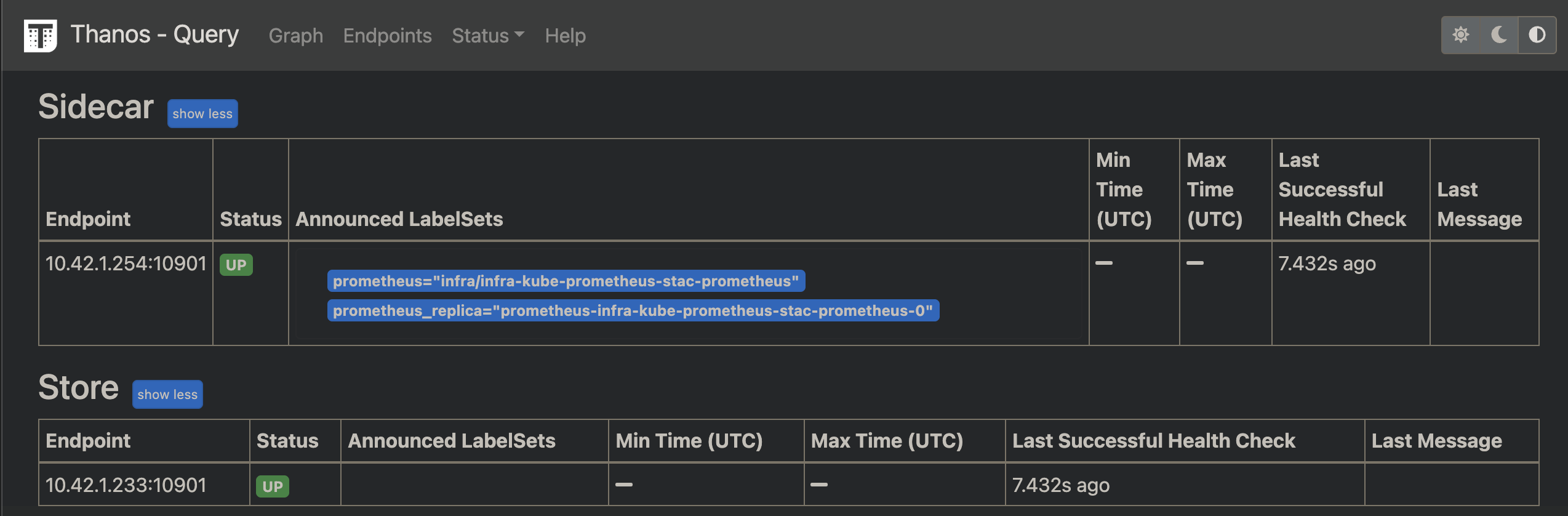
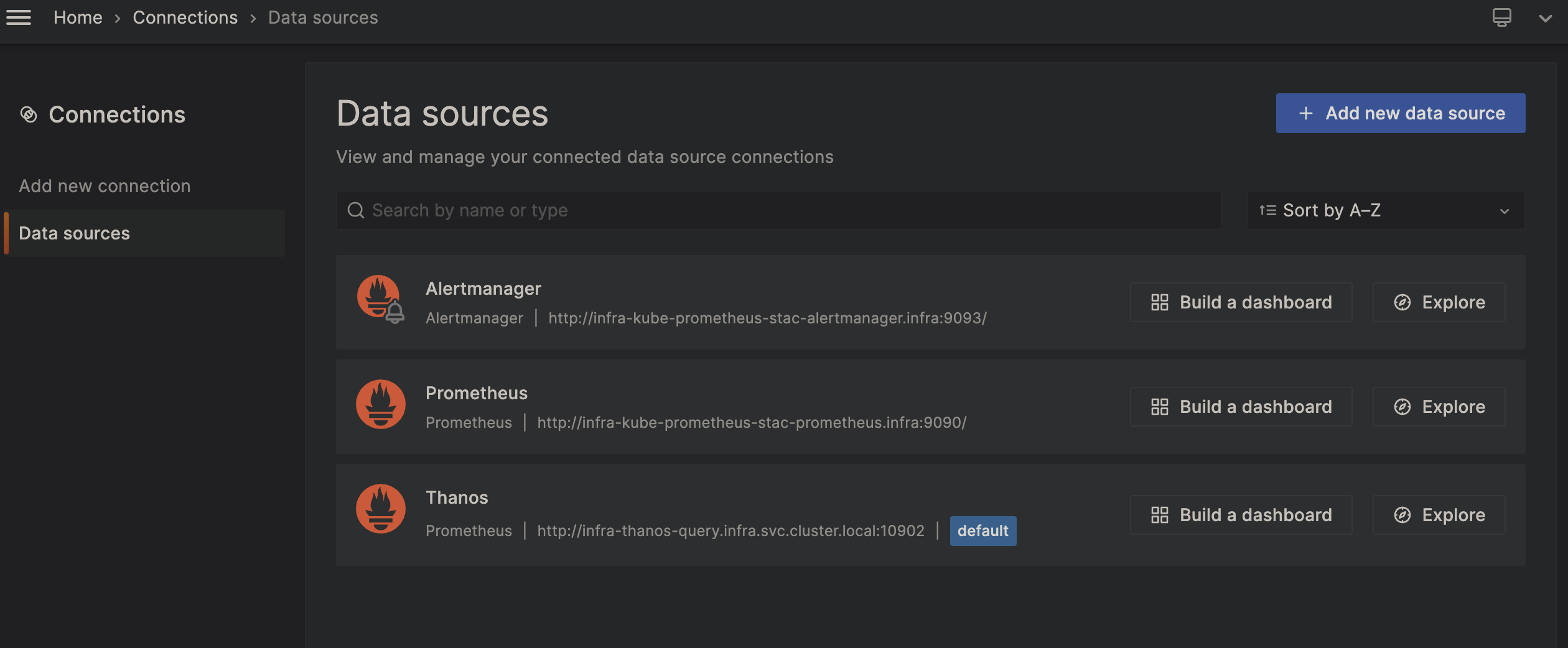
이후 Grafna를 들어가서 Connection의 메트릭 수집 Data Source를 추가한 후 사용한다.
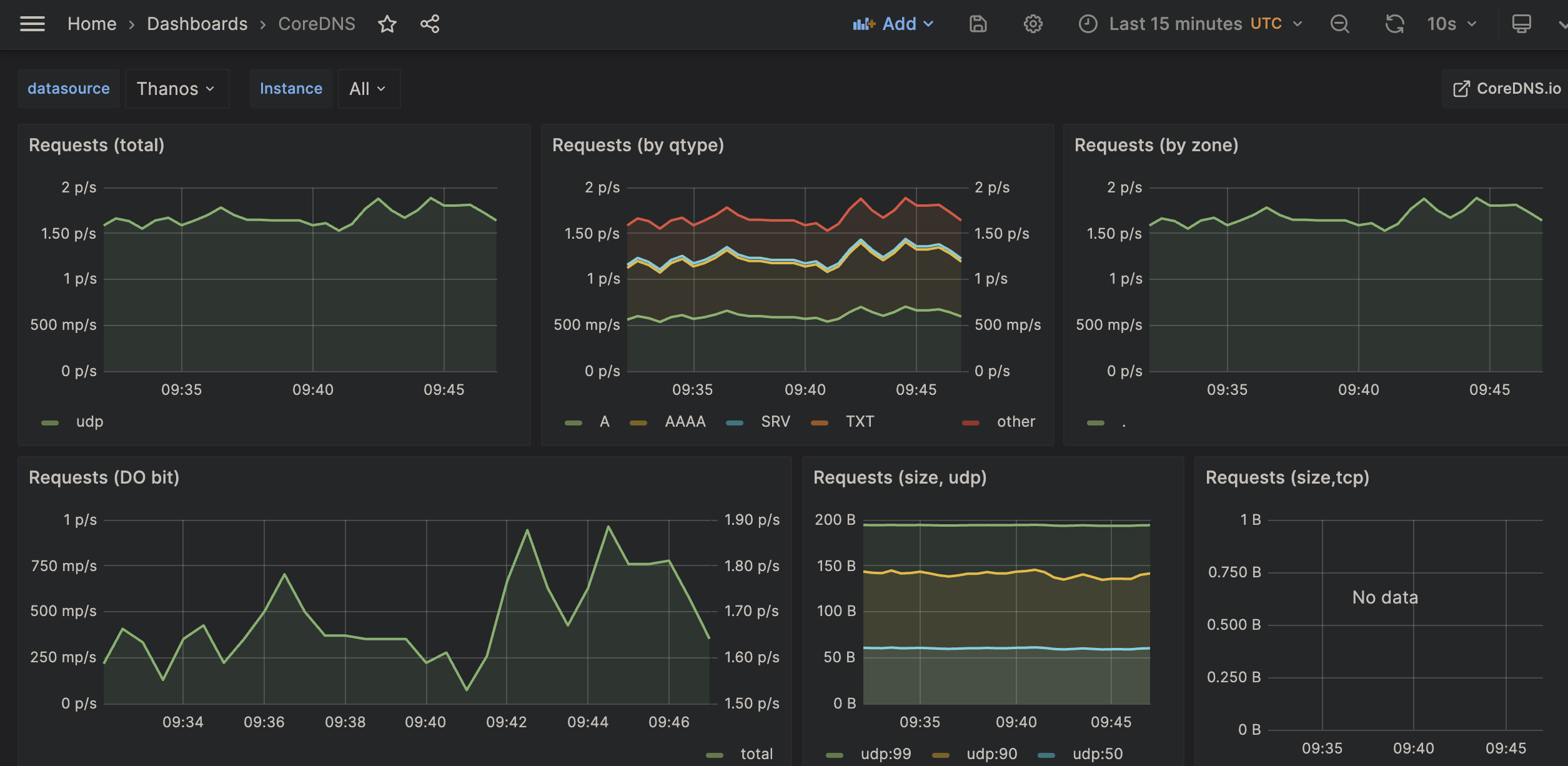
의존성에 기본적인 대시보드들이 추가되어있어, 활용해볼 수 있다.
Pod, Node, Volume, Namespace 등이 포함되어있다.
3. 애플리케이션 메트릭 수집 설정
이제 인프라 세팅을 마쳤고 이제 가장 중요한 단계가 남아있다.
"내가 배포한 Spring Boot 애플리케이션의 메트릭을 어떻게 프로메테우스로 가져오는가?" 이다.
앞서 3편에서 설명했들, Prometheus Operator는 클러스터 내부를 감시하며 ServiceMonitor라는 리소스를 찾아다닌다.
따라서 우리는 애플리케이션을 배포할 때 이 ServiceMonitor만 함께 생성해주면 된다.
ServiceMonitor 추가 (template/servicemonitor.yaml)
애플리케이션 Helm 차트에 아래와 같은 ServiceMonitor 템플릿을 추가한다.
apiVersion: v1
kind: Service
metadata:
  name: {{ include "deploy.fullname" . }}-actuator
  labels:
    {{- include "deploy.labels" . | nindent 4 }}
spec:
  type: ClusterIP
  ports:
    - port: {{ .Values.actuator.port | default 8080 }}
      targetPort: actuator-port
      protocol: TCP
      name: monitor-port
  selector:
    {{- include "deploy.selectorLabels" . | nindent 4 }}
---
apiVersion: monitoring.coreos.com/v1
kind: ServiceMonitor
metadata:
  name: {{ include "deploy.fullname" . }}-monitor
  namespace: {{ .Release.Namespace }}
  labels:
    {{- include "deploy.labels" . | nindent 4 }}
    release: prometheus-stack
spec:
  selector:
    matchLabels:
      {{- include "deploy.selectorLabels" . | nindent 6 }}
  namespaceSelector:
    matchNames:
      - {{ .Release.Namespace }}
  endpoints:
    - port: monitor-port
      path: {{ .Values.actuator.path | default "/actuator/prometheus" }}
      interval: {{ .Values.actuator.interval | default "30s" }}
actuator-port는 deployment helth check에 사용되므로 monitor-port 이름 사용
values.yaml
actuator:
  port: 8081                     # 보안을 위해 8080대신 8081 사용
  path: /actuator/prometheus
  interval: 30s
설정 분석: 프로메테우스는 어떻게 타겟을 찾는가?
실제 ArgoCD를 통해 배포된 리소스를 보며 spec의 의미를 분석해본다. 이 설정은 프로메테우스에게 전달되는 "데이터 수집 지도"와 같다.
spec:
  endpoints:
    - interval: 30s
      path: /actuator/prometheus
      port: monitor-port
  namespaceSelector:
    matchNames:
      - app
  selector:
    matchLabels:
      app.kubernetes.io/instance: demo15
      app.kubernetes.io/name: deploy
대상 식별
가장 중요한 부분으로, 프로메테우스가 수집할 대상을 결정하는 기준이다.
- namespaceSelector: app 네임스페이스에 있는 리소스를 감시한다.
- matchLabels: 서비스(Service)에 설정된 라벨 중 instance: demo15와 name: deploy를 모두 가진 대상을 찾아간다. 이 라벨이 이정표 역할을 하여 정확한 타겟을 찾아낸다.
수집 규칙
대상을 찾은 후 데이터를 긁어오는 상세 규칙이다.
- port: monitor-port: 서비스 객체에서 정의한 포트 이름 중 monitor-port를 찾아 접속한다.
- path: /actuator/prometheus: Spring Boot Actuator가 메트릭을 노출하는 표준 경로로 요청을 보낸다.
- interval: 30s: 30초마다 한 번씩 데이터를 수집한다.
프로메테우스 그룹핑과 샤딩
위 설정에서 labels 섹션에 release: prometheus-stack이라는 값을 넣어주었다. 프로메테우스는 이 라벨을 보고 "내가 관리해야 할 모니터링 대상이구나" 라고 판단한다.
이 방식을 활용하면서 대규모 환경에서 그룹핑(샤딩)이 매우 간편해진다.
- 유연한 필터링: 네임스페이스나 라벨별로 수집 대상을 분리할 수 있다.
- 부하 분산: 특정 프로메테우스 인스턴스가 특정 라벨(sharding-group: A)을 가진 ServiceMonitor만 수집하도록 설정하여 부하를 분산할 수 있다.
4. 마치며
이번 실전 편을 통해 ArgoCD와 Helm을 활용해 프로메테우스와 타노스 아키텍처를 코드로 배포해 보았다.
Helm Chart로 Infra를 구성하는 경우 의존성에 따라 사용 방법도 다르기에 꼭 공식문서를 참고해서 Args를 넣는것이 바람직해보인다.
'DevOps' 카테고리의 다른 글
| [클라우드 네이티브] 5편: Fluent Bit와 Loki, 가볍고 강력한 로그 모니터링 맛보기 (0) | 2026.02.09 |
|---|---|
| [클라우드 네이티브] 3편: 고가용성 모니터링(메트릭) 아키텍처 설계 전략 (0) | 2026.02.07 |
| [클라우드 네이티브] 2편: Helm-Chart, 고가용성 로깅 아키텍처(ELK) 구현(실전) (0) | 2026.02.06 |
| [클라우드 네이티브] 1편: 고가용성 로깅 아키텍처(ELK) 설계 전략 (0) | 2026.02.06 |
| Kubernetes 기반 PostgreSQL 고가용성(HA) 아키텍처 구축 및 카오스 검증 (0) | 2026.02.01 |


